Distinguish the source
Separate facts seen in an app, preferences shared by the user and decisions from an earlier conversation. Check for outdated conditions or information still unconfirmed.
Android Bot / Service
Android Bot is a personal agent service that brings together screens, conversation and information you allow to handle complex requests. It connects the conditions, clarifies choices and actions to review, and brings the result and remaining work into view.
01 / Follow a single request
Opinions in messages, an opening in the calendar and travel conditions on a map serve the same purpose. This service screen example follows one request from context through choices, review and the result.
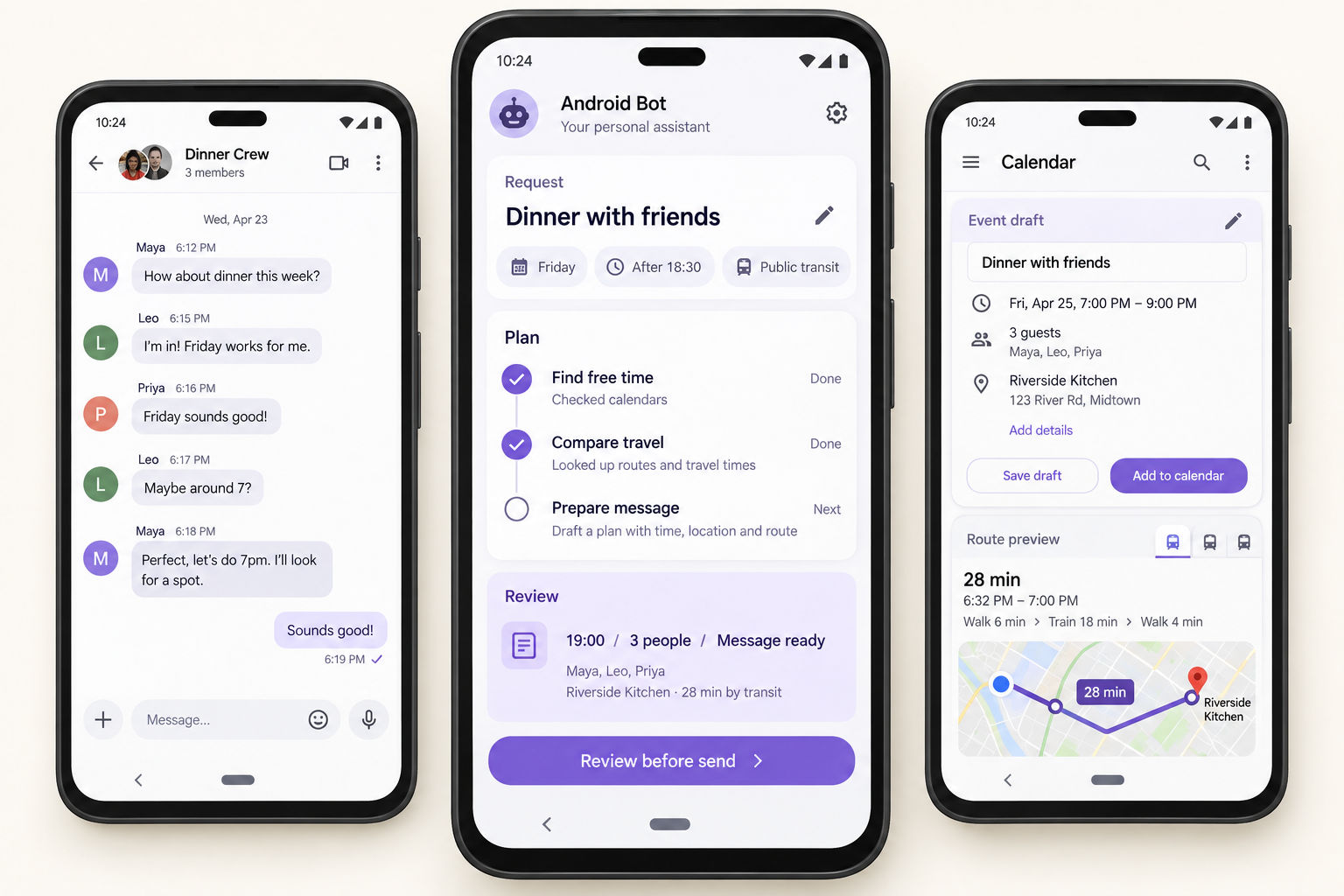
“Find a place to meet friends after finishing work at 18:30 on Friday. I’d like a public-transport journey under 30 minutes.”
The goal is to prepare dinner plans. Friday after 18:30, public transport and travel time are the criteria for the decision.
Connect agreed details in the conversation with calendar availability and travel conditions. Distinguish which screen or conversation supplied the information.
The example compares a nearby place with a convenient meeting point. Clarify whether everyone’s availability needs checking and which criterion should take priority.
Check the chosen time and place, the calendar entry and the message recipients and wording. A changed choice calls for corresponding changes in the plan and reply.
The saved meeting details and sent message are results to check. Replies from friends or a final reservation remain distinct from the parts already completed.
02 / Context and earlier choices
“Go with the second place we chose. I can meet earlier this time.” Earlier decisions and new conditions need to be read together. It should be clear which context is being used and what has changed.
Separate facts seen in an app, preferences shared by the user and decisions from an earlier conversation. Check for outdated conditions or information still unconfirmed.
Clarify which option is meant and whether the previous budget and travel conditions still apply. Connect the context needed to reduce repeated explanations.
A changed time, preference or priority calls for another look at the current task. The user should be able to correct context that no longer fits.
03 / Progress and intermediate choices
Progress in a complex request takes more than a single completion marker. A task summary, the information used, open choices and results to review should be readable together.
04 / Review before action
A meaningful approval makes the intended change understandable. Sending, adding and publishing are described with the destination, content and current requirements in view.
05 / Results shaped by the purpose
Possible times and places, calendar details and a message to send. Distinguish agreed details from choices still awaiting a reply.
Menu options and an ingredient list shaped by shared preferences and the requirements for this meal. Clarify ingredient choices and what needs checking before purchase.
A checklist linking the notice’s dates and packing requirements with family plans. Keep overlapping commitments and responsibilities visible.
A reply connecting the customer’s question with shared product facts. Separate unconfirmed stock or delivery information and promotional wording for review.
06 / Relevant information and your control
Start with app context relevant to the task and information the user can share. Unavailable context calls for a question or another way to proceed.
New requirements, corrected context, destinations and action content need to follow the user’s judgment. The experience should support review and a clear choice about the next step.
Company inquiries, consultations and talent introductions are handled as email without a separate database. This website does not collect passwords or authentication information.
Tell us the apps, Android environment, request and result you have in mind. Possible service use depends on the app screens and access allowed, and can be discussed in a consultation.