Android Bot / Use cases

Everyday requests.
Connected steps.

Explore six examples of what to ask, which information matters and where you decide. Start a consultation from an example and adapt it to your own conditions.

Illustrative service examples. Available steps depend on the apps and access you allow.

6 use cases

메시지·일정·지도와 퇴근 조건을 연결한 저녁 약속 서비스 화면 예시

Service screen example

After-work plans

Bring everyone’s constraints into one evening

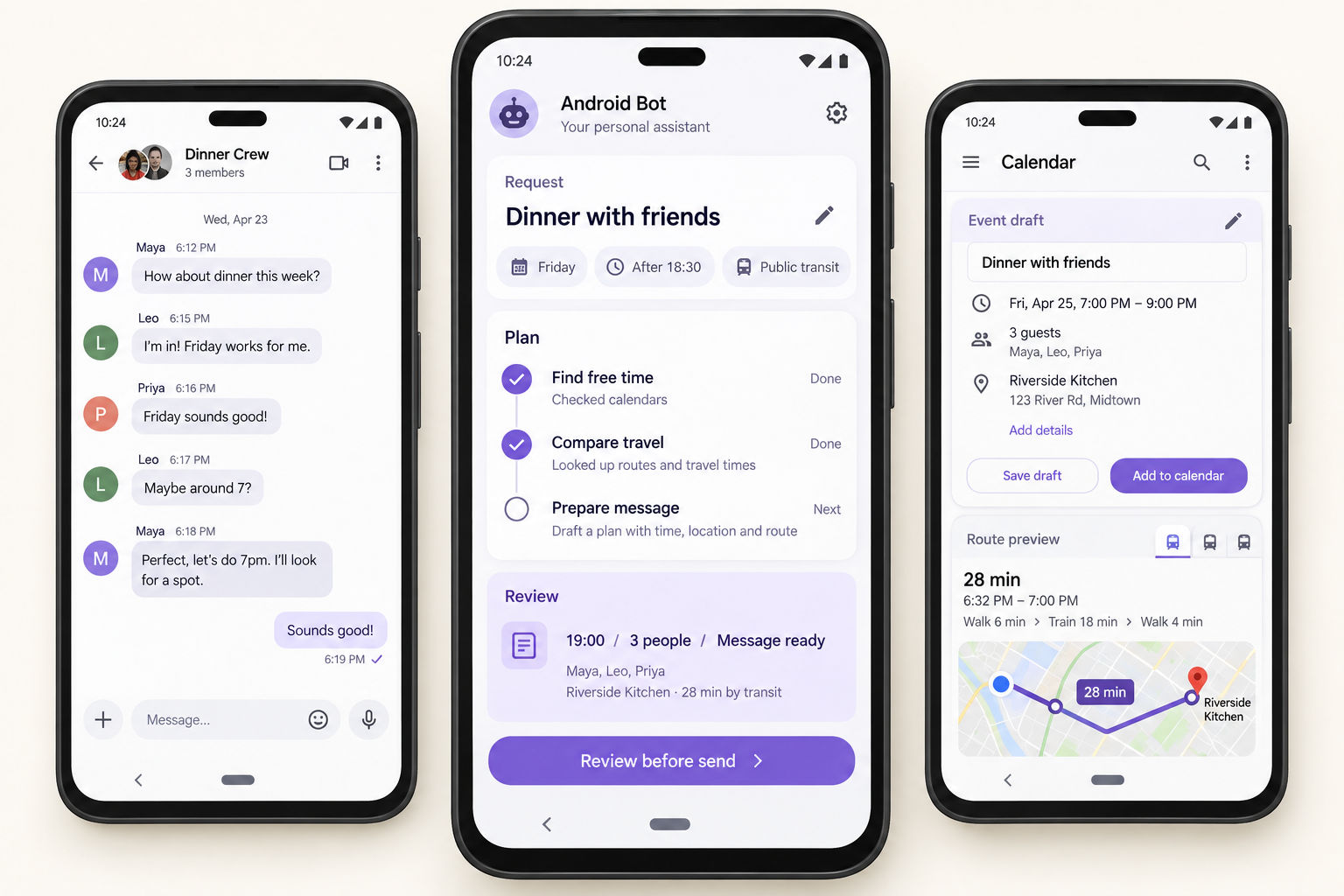
“Arrange dinner with friends after work on Friday. Please consider my schedule, the food I like and everyone’s travel time.”

CalendarMapsMessages

Information you allow: Friday’s schedule, your work location, food preferences and the conversation with your friends.

Read the connected flow

Connected screens: The conversation, Friday’s calendar and a route become one dinner plan. The screen example brings together an after-18:30 requirement and public transport.

An intermediate choice: Choose a place and time, then review which conversation to use and the wording to send.

Results to check: Align the calendar time, location and reply. Keep responses from friends and any reservation distinct as remaining work.

Explore the steps and result
  1. Check the calendar for a suitable time after work.
  2. Use food preferences and starting locations to define where to meet.
  3. Bring in the group’s messages and travel considerations.
  4. Compare a time and place, then prepare a message to share.
  5. After your review, save the agreed plan and send the approved message.

Dinner proposal

  • Friday evening · A time that fits your schedule
  • Location criteria · Preferred food and a practical meeting point
  • Message draft · “How about meeting around here on Friday evening?”

Review the place, time and recipients before approving the calendar entry and message.
Discuss this example ↗
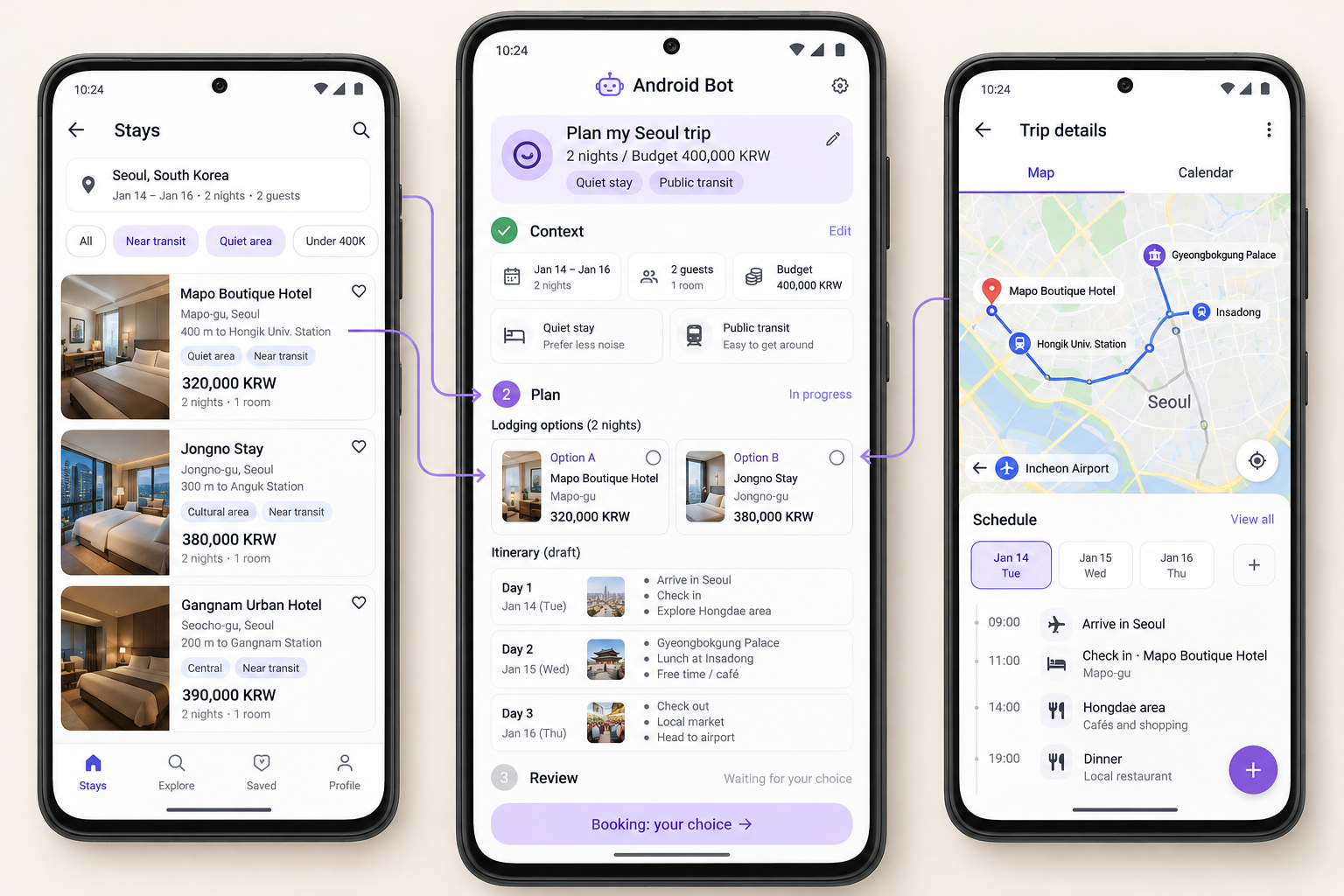
여행 날짜·예산·선호와 숙소 후보를 비교하는 서비스 화면 예시

Service screen example

Travel planning

A trip shaped by dates, budget and preferences

“Help me prepare a two-night trip next month. My budget is ₩400,000. I’d like a quiet place to stay and easy public transport.”

CalendarStay informationMaps

Information you allow: travel dates, your budget, a preference for quiet stays and the need for public transport.

Read the connected flow

Context used: Connect two nights, the budget, quiet-stay preferences and public transport with accommodation information and routes.

A choice in progress: Consider location, travel and other trip costs alongside the room price before choosing a stay.

A useful outcome: Prepare the day-by-day plan, selected stay and conditions to check before booking. You directly confirm bookings and payment.

Explore the steps and result
  1. Bring together the travel dates, total budget and essential requirements.
  2. Compare accommodation information, locations and booking conditions.
  3. Check routes between potential stays and the places you want to visit.
  4. Prepare stay options, a day-by-day plan and a booking checklist.
  5. Review your choices; complete booking confirmation and payment yourself.

Trip preparation note

  • Stay A · Easier transport / Stay B · A quieter setting
  • Three-day outline · Arrival, travel and time to rest
  • Before booking · Total budget, cancellation rules and the final amount

Choose the stay and itinerary yourself, and personally complete booking confirmation and payment.

Discuss this example ↗
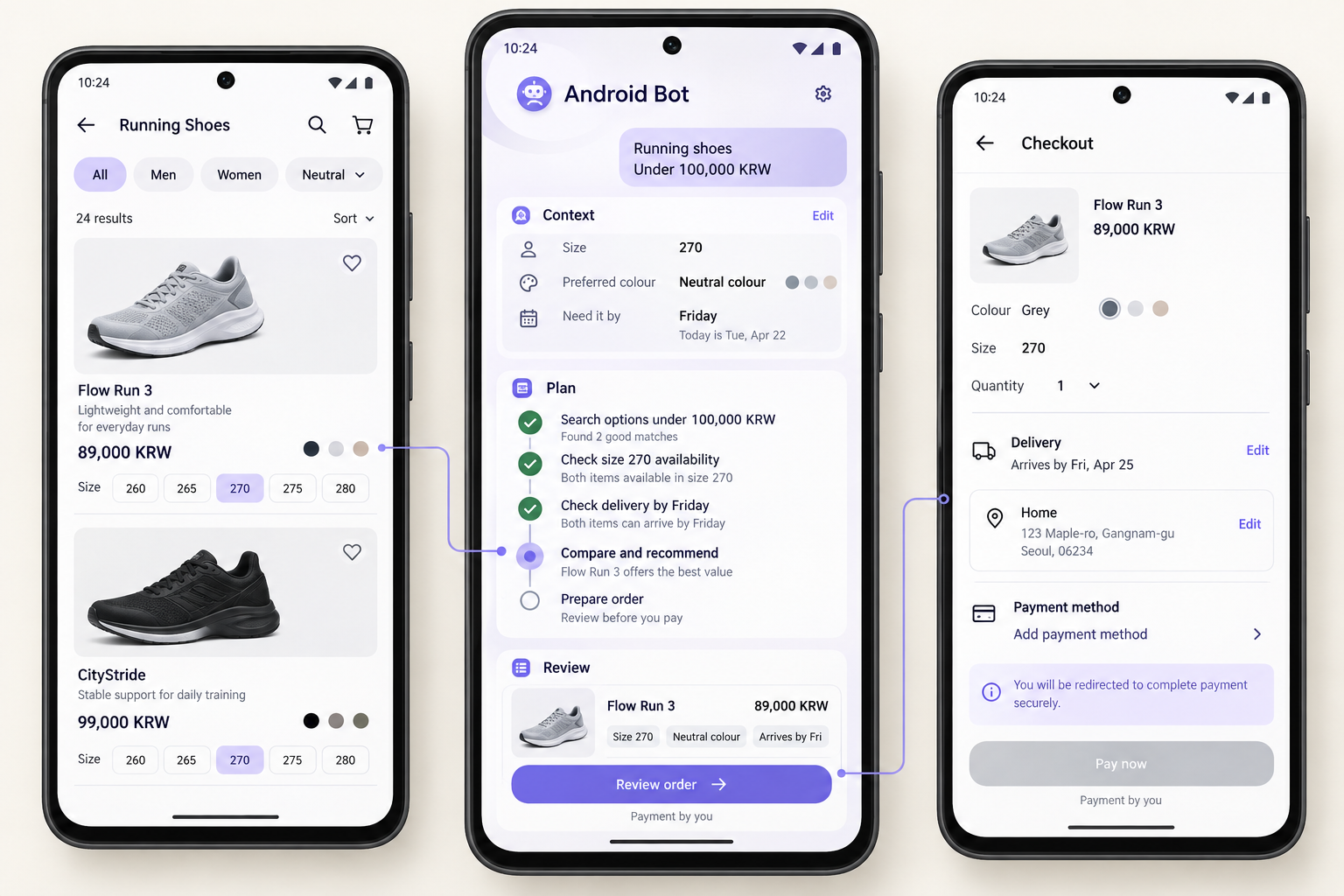
사용자 선호와 상품 조건을 비교하고 선택을 검토하는 서비스 화면 예시

Service screen example

Shopping choices

From personal requirements to an order to review

“Compare trainers using the size and preferences I shared before. Keep them under ₩100,000, with delivery before next Friday.”

Saved preferencesProduct informationOrder screen

Information you allow: your shared shoe size, preferred colours, budget and required delivery date.

Read the connected flow

Earlier preferences and new conditions: Combine shared size and colour preferences with an under-₩100,000 budget and delivery by Friday.

Comparison and revision: Connect price, specification and delivery information. Revise the conditions if this purchase needs a different option.

What to review: Check the item, options, quantity and delivery details. Keep order preparation separate from payment you complete yourself.

Explore the steps and result
  1. Check your shared size and preferences against this purchase’s requirements.
  2. Compare product specifications, prices and delivery conditions.
  3. Ask you about any unclear sizing or delivery information.
  4. Explain the differences and prepare order details for the product you choose.
  5. You check quantity, options and delivery information, then pay directly.

Purchase decision note

  • Criteria · Size, colour, under ₩100,000 and arrival before Friday
  • Option comparison · Product fit and delivery conditions in one view
  • Order details · One selected item, with options and delivery to check

Review the chosen product and order information, then complete payment yourself.

Discuss this example ↗
학교 공지의 일정과 준비물을 가족 계획으로 연결하는 서비스 화면 예시

Service screen example

Family & school

Connect the school notice with family plans

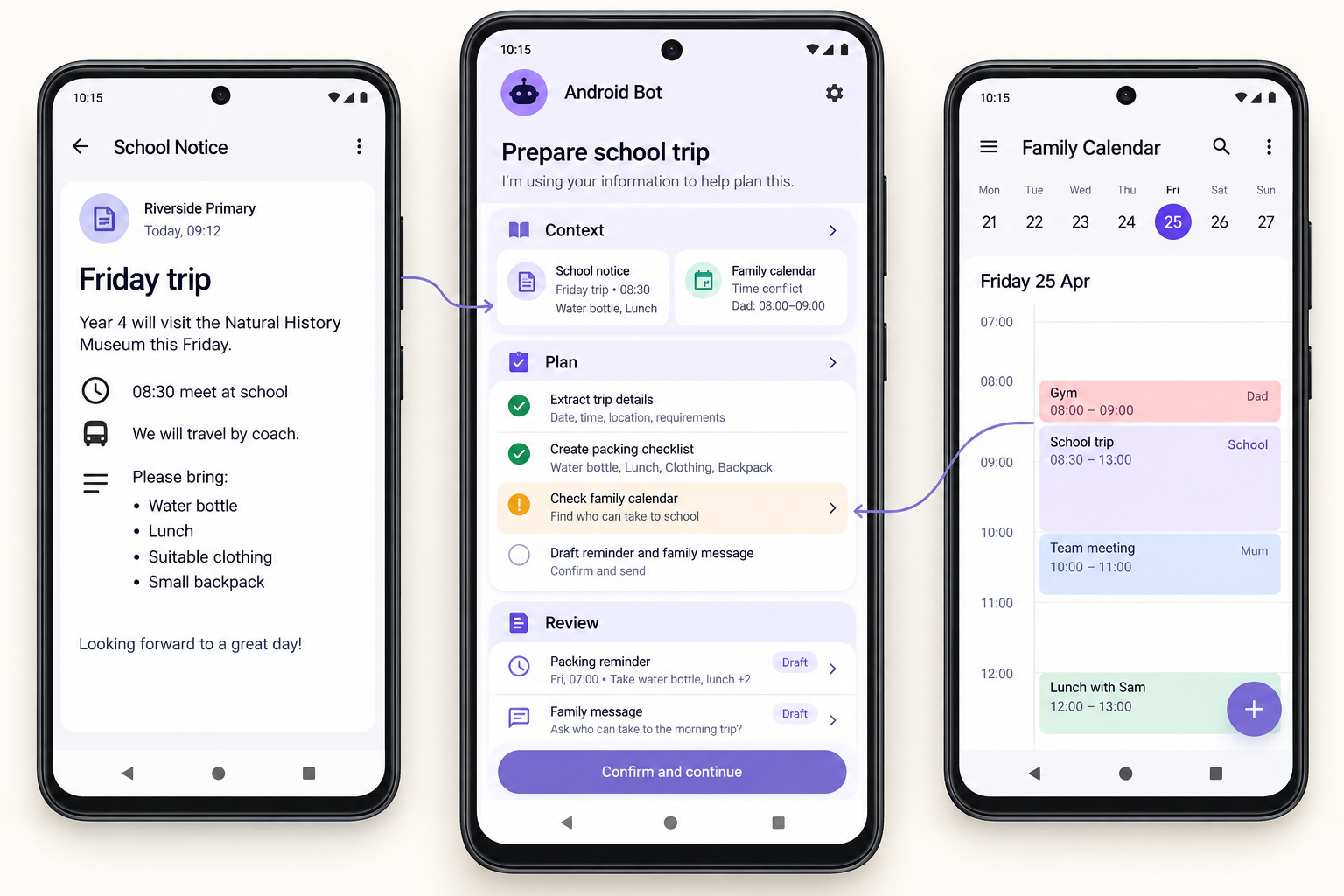
“Read the notice about my child’s Friday school trip. Make a packing list and check whether anything conflicts with our family calendar.”

School noticeFamily calendarNotes

Information you allow: the school notice, your child’s relevant schedule and the family plans you share.

Read the connected flow

The sources: Check meeting time and packing details in the school notice alongside the family calendar.

An open question: The example shows an 08:30 school meeting overlapping a family commitment, so who can help needs confirmation.

Results and work still open: Prepare a packing list, reminder and family message. Responsibility and approval to share remain choices to resolve.

Explore the steps and result
  1. Extract the date, meeting time and items to bring from the notice.
  2. Check shared family plans for timing conflicts and transport needs.
  3. Ask who is responsible or whether an item is ready when that is unclear.
  4. Prepare a checklist, calendar entries and a message for the family.
  5. After your review, save the plan and share the approved details.

School trip checklist

  • Schedule · Friday’s trip and the meeting time to verify
  • Packing · Lunch, water and personal items listed in the notice
  • Family coordination · Pick-up responsibilities and overlapping plans

Review the family schedule and message before approving saving and sharing.

Discuss this example ↗
약속 대화에서 일정·장소·답장을 정리하는 서비스 화면 예시

Service screen example

Messages to plans

Keep the details of a conversation together

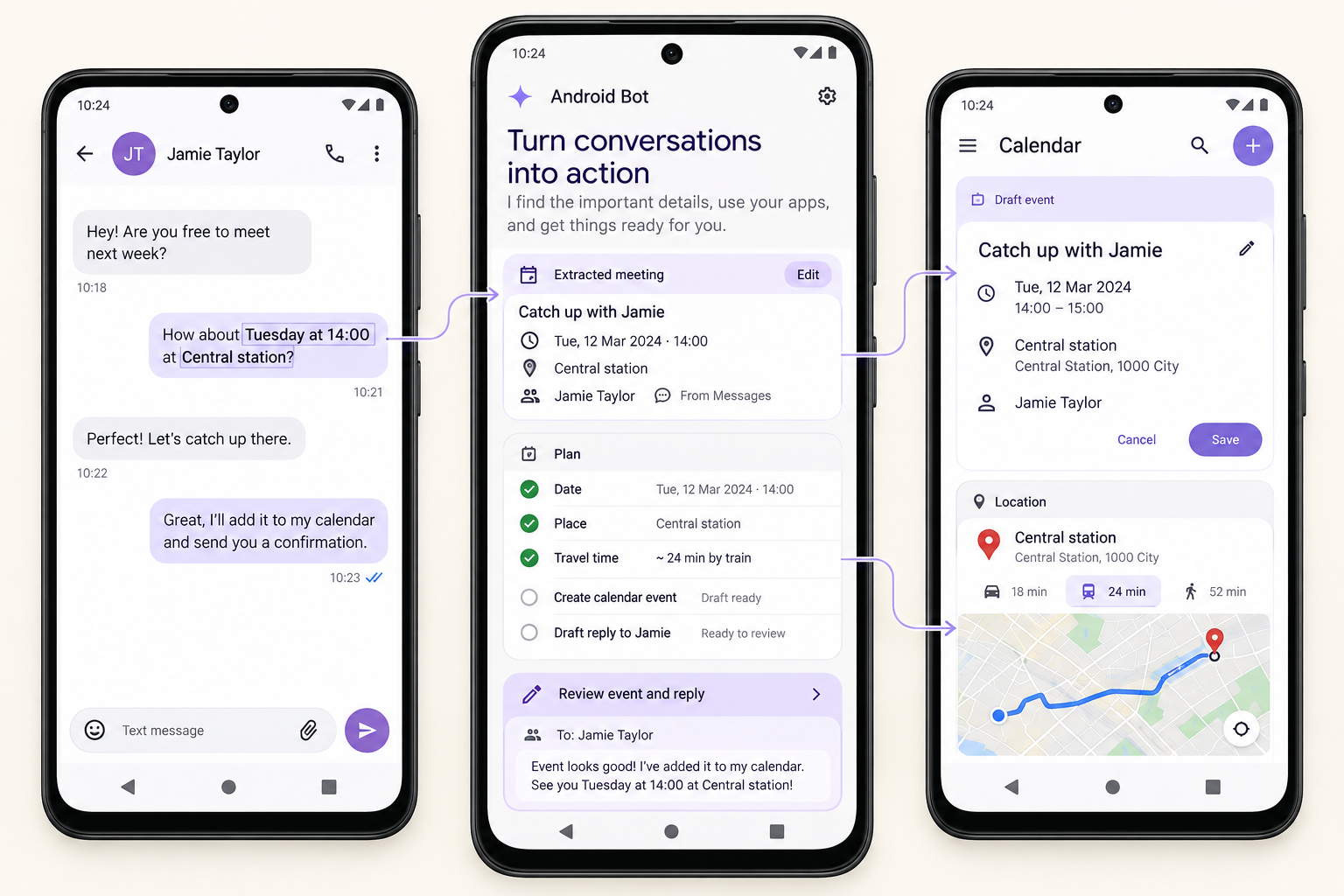
“Turn my friend’s message about Saturday into a calendar plan. Check the location and draft a reply for me.”

MessagesCalendarMaps

Information you allow: the meeting message, Saturday’s calendar, your starting location and travel needs.

Read the connected flow

Facts from the conversation: Separate the date, time and place into calendar details, then check the travel conditions on a map.

Review the actions separately: Saving the event and sending the reply each have contents and destinations to check. Details not agreed in the conversation need clarification.

Progress in view: Distinguish reading information, preparing an event and reply, and checking results after saving or sending.

Explore the steps and result
  1. Separate confirmed dates, times and places from unresolved details.
  2. Check the proposed time against existing calendar entries.
  3. Review the location and route, and ask about anything unclear.
  4. Show the calendar entry and the reply you could send.
  5. After your approval, add the meeting and send the reviewed reply.

Meeting and reply preview

  • Calendar draft · Saturday, with the agreed time and place
  • Travel note · A route to check from your starting location
  • Reply draft · “That time works. I’ve checked the location. See you Saturday!”

Review the meeting details and reply before approving the calendar entry and message.
Discuss this example ↗
고객 문의와 상품 정보를 연결해 답변을 검토하는 서비스 화면 예시

Service screen example

Small-business tasks

Keep product facts and your shop’s voice aligned

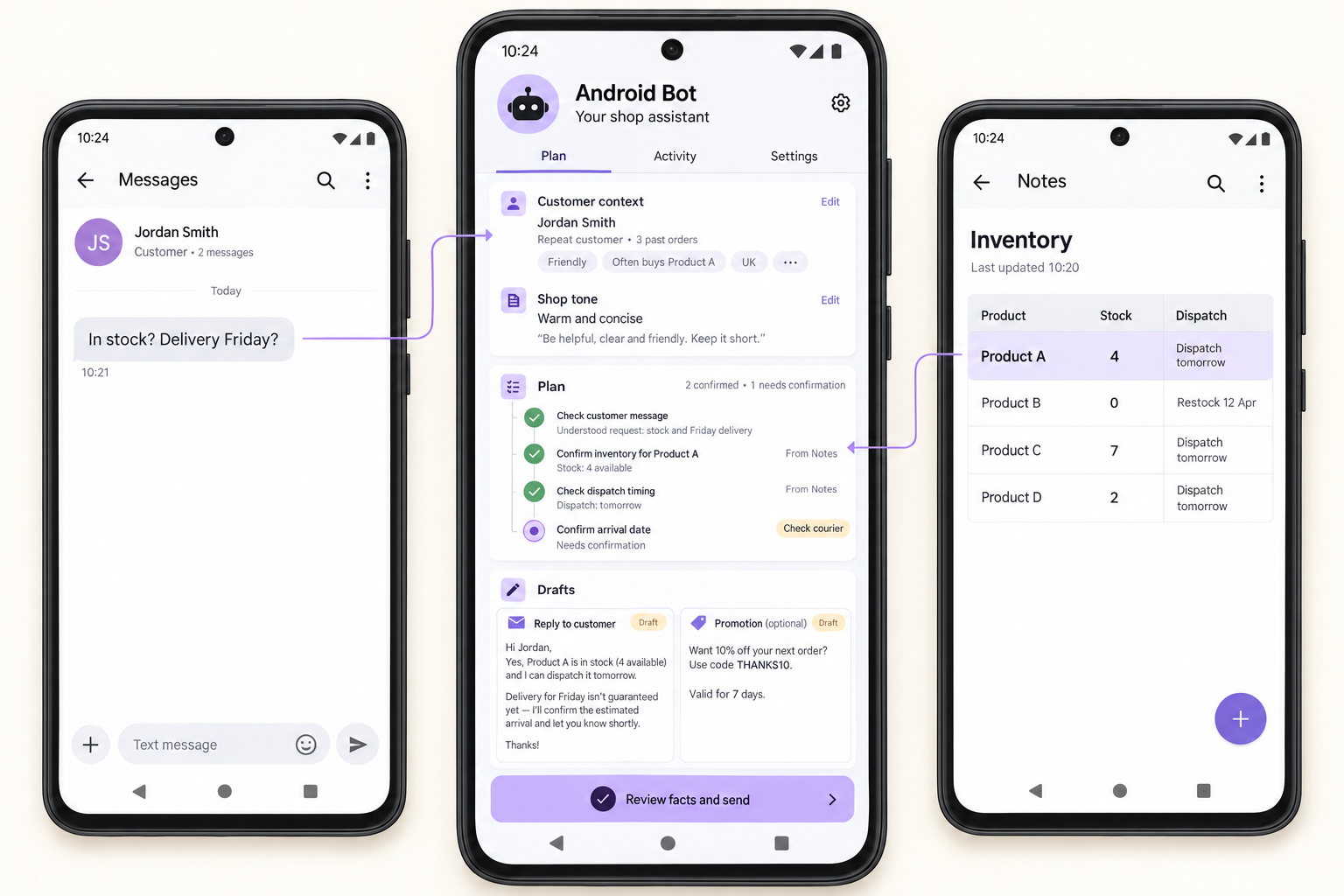
“Prepare a reply about stock and delivery for this customer. Use our product information, and draft a short promotion in our shop’s voice.”

Customer inquiryProduct informationWriting app

Information you allow: the customer’s question, shared product and shipping details, and your shop’s preferred tone.

Read the connected flow

Facts and tone: The question comes from the message, stock and dispatch from shared product material, and tone from the shop’s stated preferences.

Confirmed and still open: Dispatch preparation is different from the actual arrival date. Keep unconfirmed delivery conditions visible in the customer reply.

Separate outcomes: Review the reply and promotion separately, including the recipient and publication. Discount wording must match terms approved by the shop.

Explore the steps and result
  1. Identify the stock, specification and delivery questions in the inquiry.
  2. Check the product and shipping information you allow.
  3. Ask you about missing facts or conditions that need confirmation.
  4. Prepare a customer reply and a separate promotional draft.
  5. You review the facts and wording before approving a reply or publication.

Reply and promotion drafts

  • Customer reply · Grounded in confirmed product and shipping details
  • Needs confirmation · Unavailable stock or delivery facts flagged for review
  • Promotion draft · A short description in your shop’s preferred voice

Check the product facts, recipient and wording before approving sending or publication.

Discuss this example ↗

Make the request your own.

01

Start with the goal

Describe what you want to finish before naming apps.

02

Add your constraints

Include the deadline, budget and conditions that matter.

03

Mark your decisions

Identify the choices and actions you want to review.